Sveltos - Kubernetes Add-on Controller | Manage Kubernetes Add-ons with Ease | GitOps | FluxCD Integration
Introduction to Sveltos and GitOps Controllers
Sveltos is not competing with GitOps controllers like ArgoCD or Flux. Instead, these components work together to improve and extend existing GitOps setups. Sveltos configuration is cluster-agnostic. Its built-in Event Framework and templating features allow it to manage complex tasks and support GitOps-driven workflows.
Sveltos and Flux
From the beginning, Flux integration was available to users. Flux is a CNCF graduate project that offers users a set of continuous and progressive delivery solutions for Kubernetes that are open and extensible. By integrating Flux with Sveltos, we can automate the synchronisation of any desired Kubernetes add-ons, removing any manual steps and ensuring consistent deployment across different clusters.
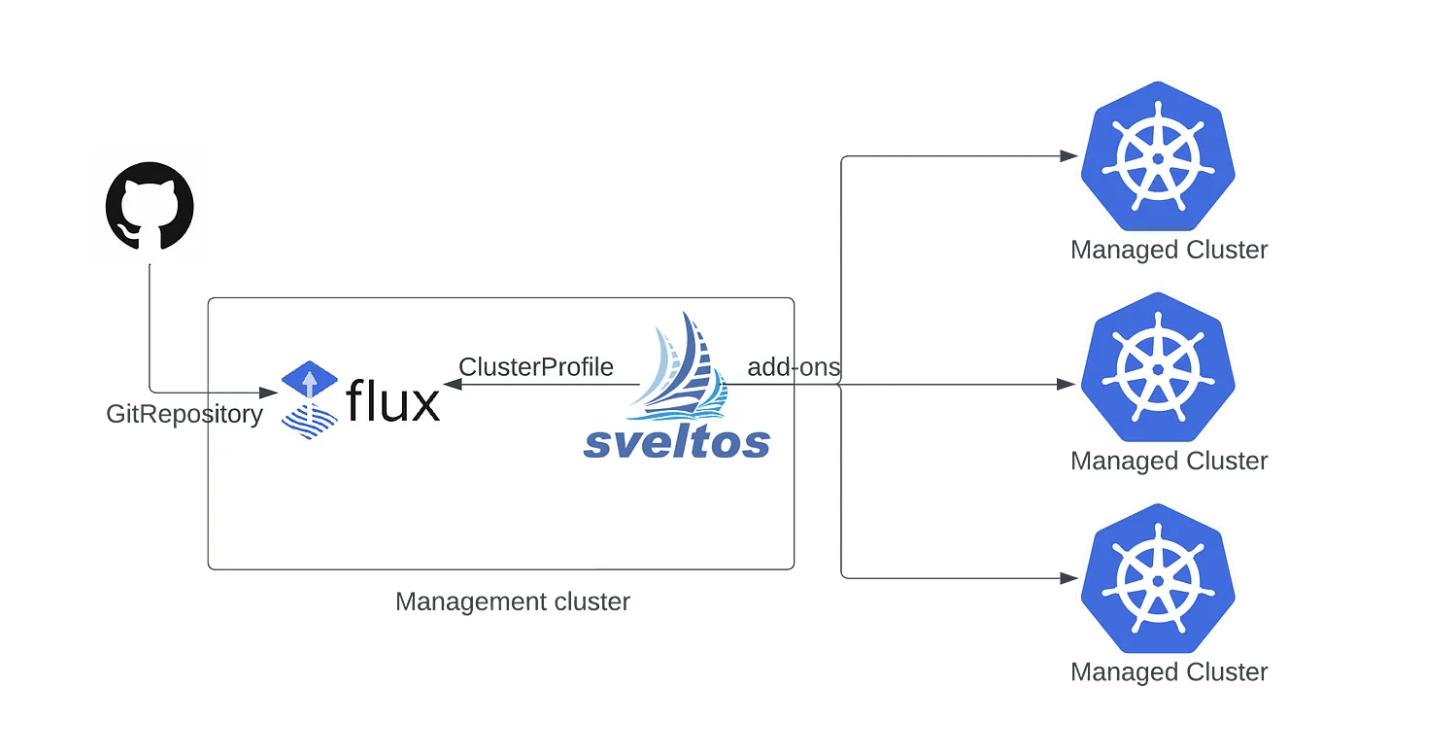
What are the benefits?
- Centralized Configuration: Store
YAML/JSONmanifests in a central Git repository or Bucket. - Continuous Synchronisation: Flux in the management cluster ensures continuous synchronisation of configurations.
- Consistent Deployments: Use Sveltos
ClusterProfilesandProfilesto reliably deploy Kubernetes add-ons in matching clusters.
Common Use-Cases
There are different deployment approaches when it comes to Sveltos and Flux integration.
| Use-Case 1: Existing Flux Setup (Mature Projects) | Use-Case 2: New GitOps/Platform Engineering Projects | |
|---|---|---|
| Starting point | Flux is already responsible for the GitOps part, and the teams do not want or need to update the existing setup | Greenfield project with no existing GitOps setup in place |
| How Sveltos is installed | Sveltos is installed and managed by Flux in the management cluster (brain of operations) | Sveltos is installed in the management cluster (brain of operations) with any means available: Infrastructure as Code (IaC), pipeline execution, scripts |
| Role of Flux | Flux continues to own any GitOps operations related | Flux is installed after Sveltos and used exclusively to synchronise manifest files into the management cluster based on specific needs and use-cases to be covered |
| Role of Sveltos | Sveltos extends the existing operations at scale using cluster-agnostic configuration. For example, automating the Flux Helm Releases based on a label identifier defined in a cluster | Sveltos takes over the deployment lifecycle of a fleet of clusters |
| Effort required | A few changes on the existing setup | Full setup from scratch |
Use-Case 1: Sveltos Integration to Existing Flux Setup
As Flux is already responsible for the GitOps part, we can install Sveltos using Flux resources. Once done, Sveltos will be used to automate the deployment of Flux Helm Releases to a fleet of clusters based on labels.
Install Sveltos
Flux Resources for Sveltos Installation
---
apiVersion: v1
kind: Namespace
metadata:
  name: projectsveltos
---
apiVersion: source.toolkit.fluxcd.io/v1
kind: HelmRepository
metadata:
  name: projectsveltos
  namespace: flux-system
spec:
  interval: 24h
  url: https://projectsveltos.github.io/helm-charts
---
apiVersion: helm.toolkit.fluxcd.io/v2
kind: HelmRelease
metadata:
  name: projectsveltos
  namespace: flux-system
spec:
  interval: 30m
  targetNamespace: projectsveltos
  storageNamespace: projectsveltos
  chart:
    spec:
      chart: projectsveltos
      version: ">=1.6.1"
      sourceRef:
        kind: HelmRepository
        name: projectsveltos
        namespace: flux-system
      interval: 12h
  install:
    crds: Create
    createNamespace: true
    timeout: 10m
    strategy:
      name: RetryOnFailure
  upgrade:
    crds: CreateReplace
    timeout: 10m
    cleanupOnFail: true
    strategy:
      name: RetryOnFailure
Flux Kustomization
Using the Flux approach, we can install Sveltos to the management cluster with no major changes to the existing setup.
Tip
Sveltos needs to be installed in the projectsveltos namespace; this is not negotiable.
Sveltos Event Framework
In this example, we will automate the deployment of Flux Helm Releases for Kyverno on clusters with the label set to kyverno=required. As a starting point, we will assign the label type=mgmt to the Sveltos management cluster because we want to control resources in the management cluster.
Next, we will work with the Sveltos Event Framework to define the trigger of an action. We listen for new Sveltos clusters with the label set to kyverno=required.
Kyverno EventSource
Let's define the trigger once an Event is detected.
Kyverno EventTrigger
apiVersion: lib.projectsveltos.io/v1beta1
kind: EventTrigger
metadata:
  name: deploy-kyverno
spec:
  sourceClusterSelector:
    matchLabels:
      type: mgmt
  destinationClusterSelector:
    matchLabels:
      type: mgmt
  eventSourceName: detect-kyverno-clusters
  oneForEvent: true
  policyRefs:
  - name: kyverno-helmrelease
    namespace: default
    kind: ConfigMap
Notice in the above YAML file, we deploy a ConfigMap in the management cluster with the name set to kyverno-helmrelease. The ConfigMap contains the Kyverno Flux Helm Release expressed in a Sveltos template.
Kyverno Flux Helm Release
apiVersion: v1
kind: ConfigMap
metadata:
  name: kyverno-helmrelease
  namespace: default
  annotations:
    projectsveltos.io/instantiate: ok
data:
  kyverno.yaml: |
    apiVersion: helm.toolkit.fluxcd.io/v2
    kind: HelmRelease
    metadata:
      name: kyverno-{{ .Resource.metadata.name  }}
      namespace: {{ .Resource.metadata.namespace }}
    spec:
      interval: 15m
      kubeConfig:
        secretRef:
          name: {{ .Resource.metadata.name }}-sveltos-kubeconfig
          key: kubeconfig
      chart:
        spec:
          chart: kyverno
          version: "v3.9.0"
          sourceRef:
            kind: HelmRepository
            name: kyverno
            namespace: flux-system
          interval: 15m
      install:
        createNamespace: true
        timeout: 10m
        remediation:
          retries: 3
      upgrade:
        timeout: 10m
        cleanupOnFail: true
        remediation:
          retries: 3
          strategy: rollback
      values:
        crds:
          enabled: true
          keep: true
The annotation projectsveltos.io/instantiate: ok is what converts a plain ConfigMap into a Sveltos template. Sveltos will pull information directly from the management cluster and dynamically pre-instantiate and deploy the resource using the detected cluster's metadata. Notice how {{ .Resource.metadata.name }} and {{ .Resource.metadata.namespace }} are automatically resolved per cluster, one template, many clusters. The ConfigMap can be further templatised based on different use cases. Both Lua and CEL languages are supported for Sveltos templating.
Tip
The above resources need to be deployed to the management cluster where Flux is installed.
Use-Case 2: Sveltos for Greenfield Environments
As we refer to more like Greenfield setups, Sveltos will be installed in the management cluster by any means available. From there, we will install Flux into the management cluster. This approach is much simpler, as we are in the beginning of defining how our project outline and architecture might look.
Label Management Cluster
Because we want to manage resources in the management cluster using Sveltos, let's add a label to the Sveltos management cluster.
Install Flux
Flux can be installed in the management cluster or any other cluster that needs a GitOps controller using the Sveltos ClusterProfile resource. In the manifest, we define the clusters we want to match and how to install Flux to the cluster.
Flux Operator ClusterProfile
apiVersion: config.projectsveltos.io/v1beta1
kind: ClusterProfile
metadata:
  name: flux
spec:
  clusterSelector:
    matchLabels:
      type: mgmt
  helmCharts:
  - repositoryURL: oci://ghcr.io/controlplaneio-fluxcd/charts
    repositoryName: flux-operator
    chartName: flux-operator
    chartVersion: 0.40.0
    releaseName: flux-operator
    releaseNamespace: flux-system
    helmChartAction: Install
  policyRefs:
  - name: flux-resources
    namespace: default
    kind: ConfigMap

  - kind: GitRepository
    name: sveltos-repo-sync # Define the Flux GitRepository resource name defined in the flux-resources ConfigMap
    namespace: flux-system
    path: ./resources/sveltos-manifests/
Sveltos Template - Flux ConfigMaps
apiVersion: v1
kind: ConfigMap
metadata:
  name: flux-resources
  namespace: default
data:
  flux_resources.yaml: |
    ---
    apiVersion: fluxcd.controlplane.io/v1
    kind: FluxInstance
    metadata:
      name: flux
      namespace: flux-system
      annotations:
        fluxcd.controlplane.io/reconcile: "enabled"
        fluxcd.controlplane.io/reconcileEvery: "1h"
        fluxcd.controlplane.io/reconcileTimeout: "5m"
    spec:
      distribution:
        version: "2.x"
        registry: "ghcr.io/fluxcd"
      components:
        - source-controller
        - kustomize-controller
        - helm-controller
      cluster:
        type: kubernetes
        size: medium
        multitenant: false
        networkPolicy: false
        domain: "cluster.local"
      commonMetadata:
        labels:
          app.kubernetes.io/name: flux
      kustomize:
        patches:
          - target:
              kind: Deployment
            patch: |
              - op: replace
                path: /spec/template/spec/nodeSelector
                value:
                  kubernetes.io/os: linux
              - op: add
                path: /spec/template/spec/tolerations
                value:
                  - key: "CriticalAddonsOnly"
                    operator: "Exists"
    ---
    apiVersion: source.toolkit.fluxcd.io/v1
    kind: GitRepository
    metadata:
      name: sveltos-repo-sync
      namespace: flux-system
    spec:
      interval: 30s
      ref:
        branch: main
      timeout: 60s
      url: https://<your domain>/<group name>/<repository name>.git
Ensure the name of the resources defined under policyRefs matches the names defined in the ConfigMap resources. The example above can be modified to include Git repositories of your preference. If a Git repository is private, we need to provide authentication. This lets Flux sync resources to the management cluster.
Final Thoughts
There is no one-size-fits-all approach. Before you begin, think about both your current and future use-cases. Whichever integration you pick, make sure the architecture stays flexible and can be extended as your needs grow.
More Resources
For more information about the Sveltos and Flux integration, have a look here. An example respository is located here. To explore Sveltos' capabilities at a large scale, take a look at Artem Lajko's post "GitOps for 15,000+ Clusters: What Large-Scale Testing with vCluster Taught Us"