Projectsveltos Sharding
Introduction to Sharding
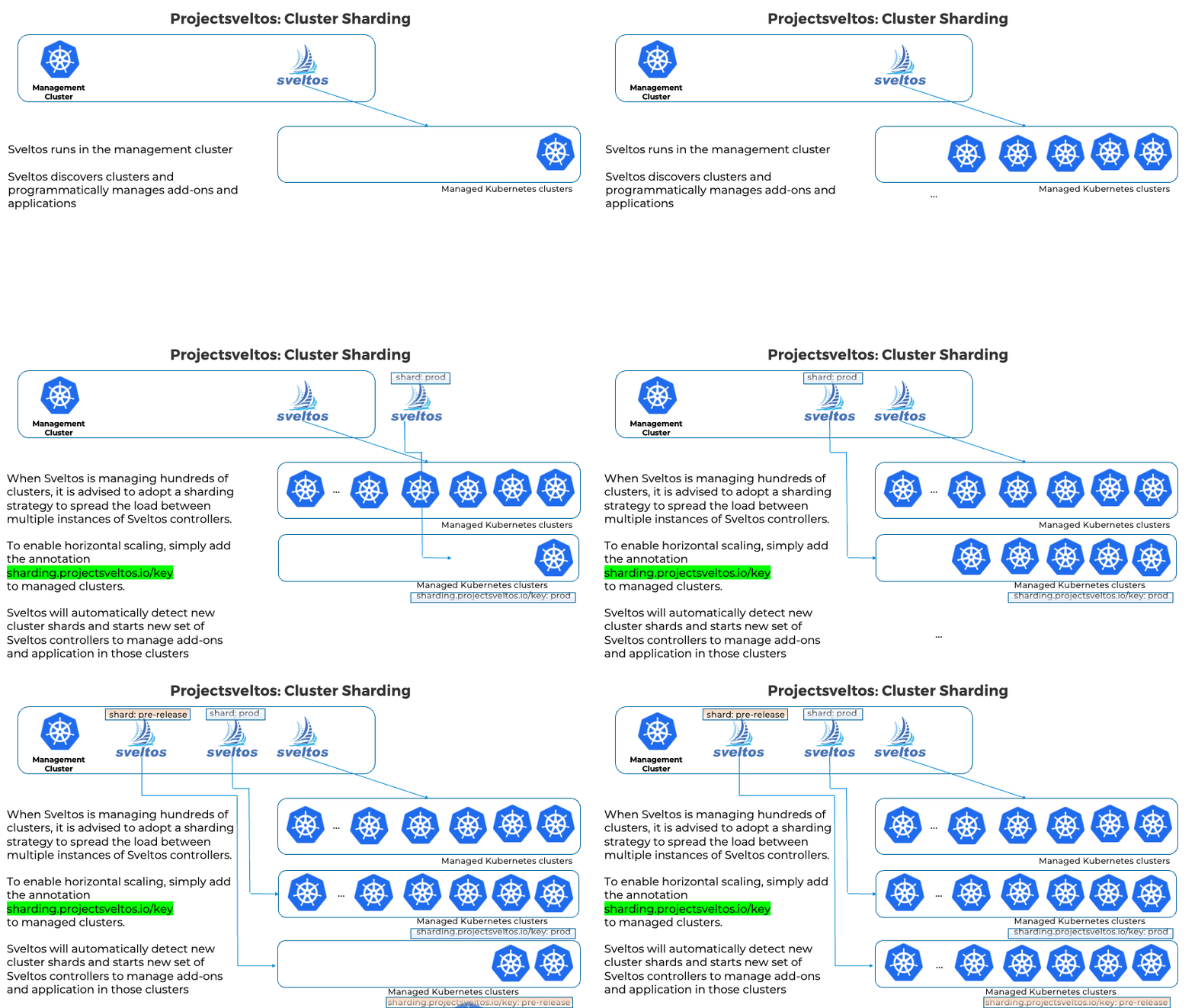
When Sveltos is managing hundreds of clusters and thousands of applications, it is recommended to adopt a sharding strategy to distribute the load across multiple Sveltos controller instances.
Sveltos has a controller running in the management cluster called the shard controller. It watches for cluster annotations. When it detects a new cluster shard, the shard controller automatically deploys a new set of Sveltos controllers to manage the shard.
How does Sveltos distribute the load? This is done by adding the special annotation sharding.projectsveltos.io/key to the managed clusters of interest. By default, all clusters are managed by the same Sveltos controller. When no more managed clusters have a special annotation set, Sveltos automatically brings down the extra Sveltos controllers.
For more information, have a look at the .gif below.
Sharding Benefits
The benefits of using a sharding strategy include:
- Improved performance: By distributing the load across multiple instances of Sveltos controllers, sharding can improve the performance of Sveltos.
- Increased scalability: Sharding allows Sveltos to manage a larger number of managed clusters and applications.
- Reduced risk: If one instance of a Sveltos controller fails, the other instances can continue to manage the applications in their respective cluster shards.
Customising Shard Component Deployments
When the shard controller creates a new set of Sveltos controllers for a shard, it uses built-in deployment templates. In some environments you may need to customise those deployments — for example to change the image registry, adjust resource requests and limits, add node selectors or tolerations, or inject imagePullSecrets.
You can provide these customisations through a single ConfigMap stored in the Sveltos namespace. Each entry in the ConfigMap's data field is an independent patch. Both Strategic Merge Patch and JSON Patch (RFC 6902) are supported.
Pass the ConfigMap name to the shard-controller via the --shard-components-config flag (for example in the shard-controller Deployment args):
Note
The shard controller watches the named ConfigMap for changes. When the ConfigMap is updated, all active shard sets are automatically re-deployed so the new patches take effect without restarting the shard controller.
Patch format
Each value in the ConfigMap's data is a YAML document with two fields:
| Field | Required | Description |
|---|---|---|
patch |
yes | The patch content — either a Strategic Merge Patch document (must include apiVersion, kind, and metadata.name headers) or a JSON Patch (RFC 6902) array |
target |
yes | Selector that controls which component the patch applies to. Use group: apps and kind: Deployment to match all five shard components, or add a name to target one specifically |
The target field mirrors the standard Sveltos patch selector:
target:
  group: apps          # API group
  kind: Deployment     # resource kind
  name: <prefix>       # optional: regex matched against the deployment name
  namespace: <ns>      # optional: match a specific namespace
Patches whose target does not match a given component are silently skipped for that component, so a single ConfigMap can carry patches for different components side by side.
Example: scheduling all shard components on dedicated nodes
A common production pattern is to reserve a set of nodes exclusively for shard controller workloads. Nodes are tainted so that regular workloads cannot land on them, and the shard components need a matching toleration (and optionally a nodeSelector) to be scheduled there.
Assume the dedicated nodes carry the taint dedicated=sveltos-shards:NoSchedule and the label node-role=sveltos-shards. The following ConfigMap uses a Strategic Merge Patch to add the toleration and the node selector to all five shard components at once. The target matches any apps/v1 Deployment, so the patch is applied to every component in the shard set.
Note
A Strategic Merge Patch must include apiVersion, kind, and metadata.name headers. The value of metadata.name is arbitrary — the target selector controls which Deployments actually receive the patch.
apiVersion: v1
kind: ConfigMap
metadata:
  name: shard-components-config
  namespace: projectsveltos
data:
  node-scheduling: |-
    patch: |-
      apiVersion: apps/v1
      kind: Deployment
      metadata:
        name: any-name
      spec:
        template:
          spec:
            tolerations:
              - key: dedicated
                operator: Equal
                value: sveltos-shards
                effect: NoSchedule
            nodeSelector:
              node-role: sveltos-shards
With this in place, every Deployment shard-controller creates for any shard key will be scheduled exclusively on the dedicated nodes.
Example: per-component resource limits
Different Sveltos components have different resource profiles. For example, the healthcheck-manager polls managed clusters frequently and may need more memory than the other components, while the others can run with lighter settings. Applying a blanket resource-limit patch to all components would either over-provision the lightweight ones or under-provision the busy ones.
Use the name field in target to restrict a patch to one specific component. The name value is treated as an anchored regular expression (kustomize wraps it as ^(?:<name>)$). Because shard deployment names include the shard key (e.g. hc-manager-shard1), use a trailing .* so the pattern matches any shard suffix — for example hc-manager.* matches hc-manager-shard1, hc-manager-eu-west, and so on.
Use a JSON Patch (RFC 6902) when targeting a single component. A Strategic Merge Patch requires a metadata.name in the patch body to identify the resource, but shard deployment names are dynamic (they include the shard key), so there is no fixed name to put there. JSON Patch operates on JSON paths directly and has no such requirement:
apiVersion: v1
kind: ConfigMap
metadata:
  name: shard-components-config
  namespace: projectsveltos
data:
  hc-manager-limits: |-
    patch: |-
      - op: replace
        path: /spec/template/spec/containers/0/resources/requests/cpu
        value: 100m
      - op: replace
        path: /spec/template/spec/containers/0/resources/requests/memory
        value: 256Mi
      - op: replace
        path: /spec/template/spec/containers/0/resources/limits/cpu
        value: 500m
      - op: replace
        path: /spec/template/spec/containers/0/resources/limits/memory
        value: 512Mi
    target:
      group: apps
      kind: Deployment
      name: hc-manager.*
Tip
The key names inside data (here hc-manager-limits) are arbitrary. Use descriptive names to make the intent of each patch clear.
The same pattern applies to any of the other four components. The deployment name prefix and main container name for each are:
| Component | Deployment name prefix | Main container name |
|---|---|---|
| addon-controller | addon-controller |
controller |
| classifier | classifier-manager |
manager |
| sveltoscluster-manager | sc-manager |
manager |
| event-manager | event-manager |
manager |
| healthcheck-manager | hc-manager |
manager |
A single ConfigMap can hold one entry per component, giving each its own resource profile.
Applying the ConfigMap
Create the ConfigMap in the Sveltos namespace, then add --shard-components-config=<configmap-name> to the shard-controller Deployment:
kubectl apply -f shard-components-config.yaml

kubectl -n projectsveltos patch deployment shard-controller --type=json \
  -p='[{"op":"add","path":"/spec/template/spec/containers/0/args/-","value":"--shard-components-config=shard-components-config"}]'
From that point on, every new shard set the shard controller creates will have the patches applied. Updating the ConfigMap triggers an immediate re-deploy of all existing shard sets.