Sveltos Configuration Drift
Configuration Drift
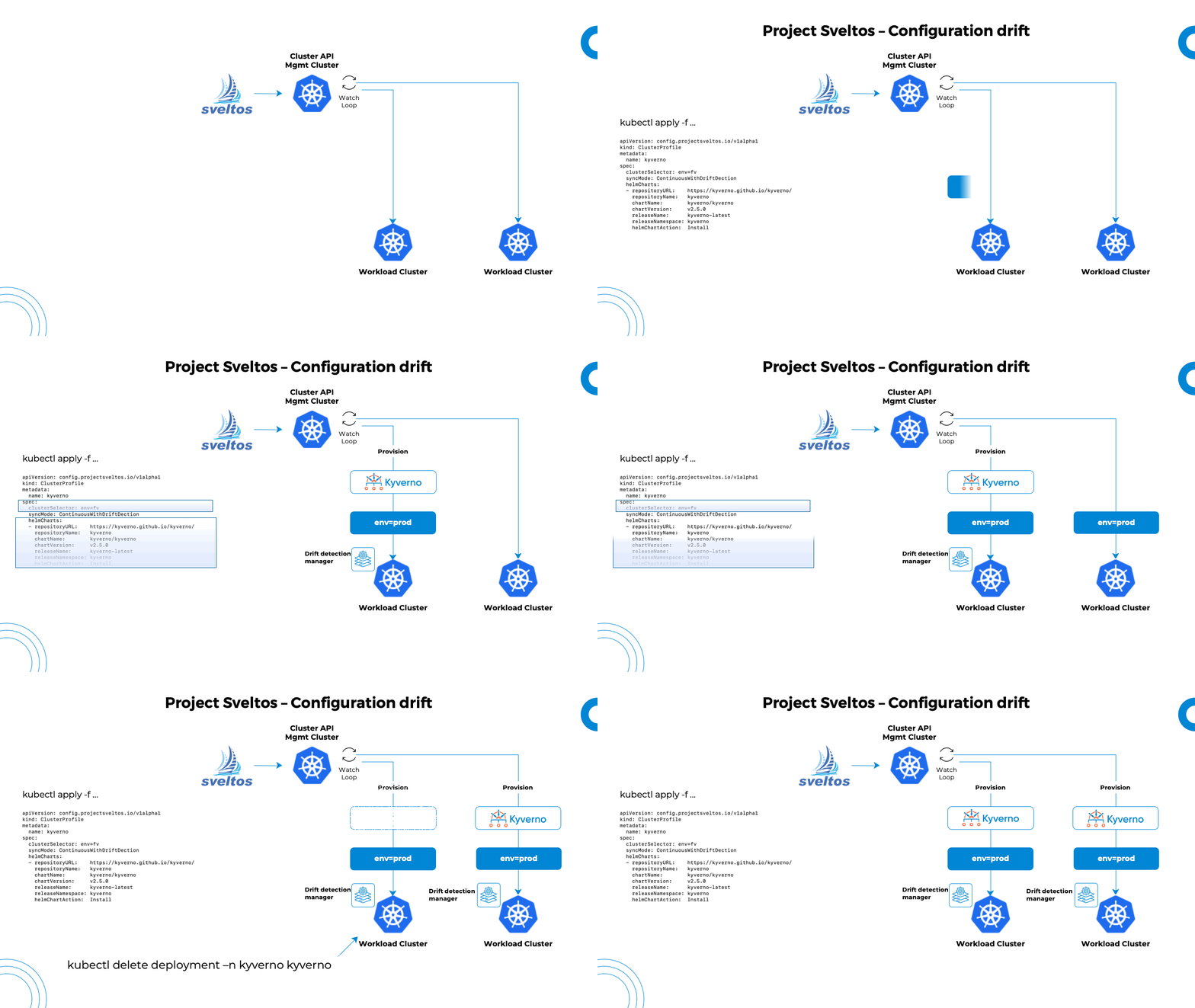
Configuration drift is a commonly used term to describe a change that takes place in an environment. Drift is an issue as it causes systems and parts of a system which supposed to be consistent, to become inconsistent and unpredictable. In our case, configuration drift is a change of a resource deployed by Sveltos down the managed clusters.
Sveltos allows users to set the sync mode within a ClusterProfile to ContinuousWithDriftDetection. It enables Sveltos to monitor the state of managed clusters and detect configuration drift for any of the resources deployed by a ClusterProfile.
---
apiVersion: config.projectsveltos.io/v1beta1
kind: ClusterProfile
metadata:
  name: deploy-kyverno
spec:
  syncMode: ContinuousWithDriftDetection
  helmCharts:
  - repositoryURL:    https://kyverno.github.io/kyverno/
    repositoryName:   kyverno
    chartName:        kyverno/kyverno
    chartVersion:     v3.3.3
    releaseName:      kyverno-latest
    releaseNamespace: kyverno
    helmChartAction:  Install
When Sveltos detects a configuration drift, it will automatically re-sync the cluster state back to its original state which is described in the management cluster. What actually happens, Sveltos deploys a service in each managed cluster and configures it with a list of Kubernetes resources deployed for each ClusterProfile in SyncModeContinuousWithDriftDetection mode. The service starts a watcher for each GroupVersionKind with at least one resource to watch. When any watched resources are modified (labels, annotations, spec or rules sections), the service notifies the management cluster about potential configuration drifts. The management cluster then reacts by redeploying affected ClusterProfiles.
Sveltos ensures the systems are always consistent and predictable, preventing unexpected issues.
Note
To learn more about the available syncMode options, take a look here.
Which Resources Drifted
When Sveltos detects a configuration drift, it records which resources changed in the ClusterSummary, one history for each feature (Helm, Resources, Kustomize). The history is in status.featureSummaries[].driftHistory.
status:
  featureSummaries:
  - featureID: Helm
    lastAppliedTime: "2026-10-08T08:32:10Z"
    driftHistory:
      lastDetectedTime: "2026-10-08T08:31:53Z"
      resources:
      - group: ""
        kind: ServiceAccount
        namespace: nginx
        name: nginx-latest-nginx-ingress
        helmReleaseName: nginx-latest
        helmReleaseNamespace: nginx
        detectedTime: "2026-10-08T08:31:53Z"
      - group: apps
        kind: Deployment
        namespace: nginx
        name: nginx-latest-nginx-ingress-controller
        helmReleaseName: nginx-latest
        helmReleaseNamespace: nginx
        detectedTime: "2026-10-08T08:25:12Z"
lastDetectedTimeis when the most recent drift was detected.resourceslists the resources that drifted, the most recently drifted first: group, kind, namespace (empty for a cluster scoped resource) and name.detectedTimeis when that resource last drifted. For the Helm feature,helmReleaseNameandhelmReleaseNamespacetell which release deployed the resource.truncatedis set totruewhen the most recent drift involved more than 20 resources. Only the first 20 were reported.
sveltosctl show drift-history displays the same information as a table, for any cluster and profile (see show drift-history). The dashboard shows it in the Drift history button of the cluster's Profiles tab.
A few things to know:
- Each new drift is added to the history. A resource that drifts more than once is listed once, with the time of its latest drift. Up to 20 resources are kept for each feature, and when that number is exceeded the resource that drifted longest ago is dropped.
- The history stays in the ClusterSummary after Sveltos has corrected the drift. To tell whether the most recent drift was already corrected, compare
lastDetectedTimewithlastAppliedTime. IflastAppliedTimeis later, Sveltos has deployed the resources again since that drift. - The history is only set for a ClusterProfile or Profile in
ContinuousWithDriftDetectionmode. - When the component that detected the drift does not report which resources changed (an older
drift-detection-manageror, for a cluster in pull mode, an oldersveltos-applier),lastDetectedTimeis updated and the resources already in the history are kept unchanged.
The drift-detection-manager lists the drifted resources in the status.driftedResources of the ResourceSummary, up to 20 and with driftedResourcesTruncated set when there are more. The addon-controller adds them to the history in the ClusterSummary and then clears the list, so you normally read the ClusterSummary.
Note
The Sveltos MCP Server has a list_configuration_drift tool that returns this history for a cluster, a profile or both, so an AI assistant can answer "why was this chart redeployed?" or "what keeps changing this Deployment?".
Ignore Annotation
We can stop certain resources from being tracked for configuration drift. This is done by adding a special annotation projectsveltos.io/driftDetectionIgnore to the resources of interest.
The below ClusterProfile will deploy a Kyverno helm chart. Patches are used to apply annotation to the Kyverno kyverno-admission-controller deployment.
Any changes made to the resources deployed by the Helm chart will be flagged as a configuration drift. However, any modifications directly to the kyverno-admission-controller deployment will not be detected as drift.
    apiVersion: config.projectsveltos.io/v1beta1
    kind: ClusterProfile
    metadata:
      name: deploy-kyverno
    spec:
      clusterSelector:
        matchLabels:
          env: fv
      syncMode: ContinuousWithDriftDetection
      helmCharts:
      - repositoryURL:    https://kyverno.github.io/kyverno/
        repositoryName:   kyverno
        chartName:        kyverno/kyverno
        chartVersion:     v3.3.3
        releaseName:      kyverno-latest
        releaseNamespace: kyverno
        helmChartAction:  Install
      patches:
      - target:
          group: apps
          version: v1
          kind: Deployment
          name: "kyverno-admission-controller"
        patch: |
          - op: add
            path: /metadata/annotations/projectsveltos.io~1driftDetectionIgnore
            value: "ok"
Ignore Fields
We can optionally specify fields to be excluded from the drift detection using JSON Pointers. The below snippet is an example of how this could be achieved.
apiVersion: config.projectsveltos.io/v1beta1
kind: ClusterProfile
metadata:
  name: nginx
spec:
  clusterSelector:
    matchLabels:
      env: prod
  syncMode: ContinuousWithDriftDetection
  helmCharts:
  - repositoryURL:    https://helm.nginx.com/stable/
    repositoryName:   nginx-stable
    chartName:        nginx-stable/nginx-ingress
    chartVersion:     1.3.1
    releaseName:      nginx-latest
    releaseNamespace: nginx
    helmChartAction:  Install
  driftExclusions:
  - paths:
    - "/spec/replicas"
    target:
      kind: Deployment
Customize drift-detection-manager configuration
In some cases, we might want to tailor the deployment of the drift-detection-manager. To achieve this, the addon-controller pod accepts a new argument named drift-detection-config.
The drift-detection-config argument points to a ConfigMap within the projectsveltos namespace. The ConfigMap holds patches that will be applied to the drift-detection-manager before its deployment in the managed cluster.
ConfigMap Example
apiVersion: v1
kind: ConfigMap
metadata:
  name: drift-detection
  namespace: projectsveltos
data:
  patch: |-
    apiVersion: apps/v1
    kind: Deployment
    metadata:
      name: drift-detection-manager
    spec:
      template:
        spec:
          containers:
            - name: manager
              image: registry.company.io/projectsveltos/drift-detection-manager:dev
              resources:
                requests:
                  memory: 256Mi
Along with creating the ConfigMap, we also need to configure the addon-controller deployment to use it. To do this, add the below argument to the deployment.
With the defined configuration, the drift-detection-manager will get deployed in each managed cluster with the below settings.
- Request memory: 256Mi
- Image: projectsveltos/drift-detection-manager:dev
Tip
If you are deploying Sveltos using the official Helm chart and need to patch the drift-detection-manager before deployment, include the necessary values in your values.yaml file.
$ helm install projectsveltos projectsveltos/projectsveltos -n projectsveltos -f values.yaml
addonController:
  controller:
    args:
    - --diagnostics-address=:8443
    - --report-mode=0
    - --shard-key=
    - --v=5
    - --version=v0.44.0
    argsAgentMgmtCluster:
    - --diagnostics-address=:8443
    - --report-mode=0
    - --agent-in-mgmt-cluster
    - --shard-key=
    - --v=5
    - --version=v0.44.0
    - --drift-detection-config=drift-detection-config
agent:
  managementCluster: true
Namespace-Scoped Watch Mode
When drift-detection-manager runs in the management cluster (agentless mode, --agent-in-mgmt-cluster above), the credential it uses to reach a managed cluster might already be restricted to a subset of namespaces — a managed cluster whose owner only grants Sveltos access to specific namespaces, for example. By default, drift-detection-manager watches resources cluster-wide, which such a restricted credential cannot do.
Adding the annotation agent.projectsveltos.io/watch-namespaces to the Cluster or SveltosCluster instance, with a comma-separated list of namespaces, restricts its watches to just those namespaces. The same annotation also restricts sveltos-agent's own watches, when sveltos-agent is deployed agentlessly against the same managed cluster (see Classifier Controller Configuration) — one annotation controls both. Cluster-scoped resources are unaffected either way: RBAC for those is whatever the credential actually grants, independent of this setting.
Restricting the actual watches requires a valid Sveltos Enterprise or Enterprise Plus license granting the NamespaceScopedAgents feature. Without one, the annotation is ignored for that purpose and watches proceed cluster-wide, same as if it weren't set — a genuinely restricted credential still behaves correctly either way (it simply can't watch outside its granted namespaces), the license only gates whether Sveltos proactively narrows its own watch scope to match, rather than finding out the hard way.
addon-controller's own search for stale resources (ones no longer referenced by a ClusterProfile/Profile's policyRefs/kustomizationRefs, that need removing) honors the same annotation too, but unconditionally, no license required — it only ever narrows where addon-controller itself looks, using whatever RBAC the same credential already has.
Note
Contact support@projectsveltos.io to explore license options.