Video
To learn more about the Sveltos Pull Mode, check out the Youtube Video. If you find this valuable, we would be thrilled if you shared it! 😊
Sveltos Cluster Registration Pull Mode
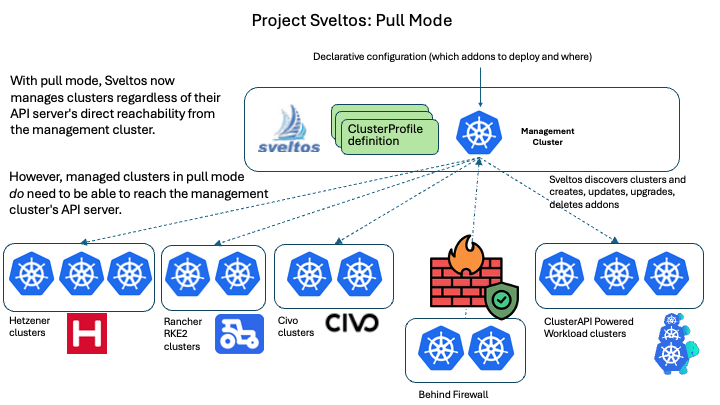
Sveltos supports managed cluster registration in Pull Mode. In this model, managed clusters actively pull configuration and add-ons from a central source, rather than having the management cluster push them directly to the managed clusters.
The Pull Mode is ideal for managed clusters behind a firewall, in air-gapped environments, edge deployments with limited bandwidth or highly regulated and secure setups.
Enterprise Feature
Test the Pull Mode with up to two managed clusters for free. Need more than two clusters? Contact us at support@projectsveltos.io to explore license options.
If Sveltos is not already installed, have a look at the installation details located here.
How does it work?
While the core Sveltos controllers run in a management cluster and orchestrate deployments, the concept of Pull Mode becomes relevant when managing clusters in challenging network environments such as firewalled, air-gapped, or edge deployments, where direct inbound access from the management cluster to the managed clusters is either not possible or not desired.
This is how the Pull Mode flow works:
- Management Cluster: It defines the desired state. We define our
ClusterProfile/Profileresources in the management cluster, specifying which add-ons and configurations should be applied to which managed clusters by utilising the Kubernetes labels selection concept. - Managed Cluster: Rather than the management cluster initiating all deployments, a component on the managed cluster initiates a connection to the management cluster.
- Configuration Fetching: The managed cluster pulls the relevant configuration, manifest, or Helm chart from the management cluster. The management cluster prepares the relevant configuration bundle for the managed clusters in Pull Mode.
- Apply: The managed cluster's local agent applies the pulled configurations to the cluster.
Advantages
The following items are some of the benefits of utilising Sveltos in Pull Mode.
- Firewalled and Air-Gapped Environments: This is the primary driver. When managed clusters are behind firewalls or in air-gapped networks, direct inbound connections from a central management cluster are not possible. Sveltos in Pull Mode allows the managed clusters to reach out to the management cluster or a Git repository to obtain deployment instructions.
- Edge Deployments: For edge locations with intermittent connectivity or limited network bandwidth, the Sveltos Pull Mode offers resilience.
- Security: Reducing the need for inbound ports to managed clusters enhances the security posture of an environment by minimising the attack surface.
Tip
Find out here what is being deployed by Sveltos when we talk about Edge deployments.
Register Cluster
To register a cluster in Pull mode, we use the sveltosctl.
Management Cluster
Pointing the KUBECONFIG to the management cluster where Sveltos is installed, perform the following sveltosctl register command.
$ export KUBECONFIG=</path/to/kubeconfig/management/cluster>

$ sveltosctl register cluster \
    --namespace=monitoring \
    --cluster=prod-cluster \
    --pullmode \
    --labels=environment=production,tier=backend \
    > sveltoscluster_registration.yaml
| Parameter | Description |
|---|---|
--namespace |
The namespace in the management cluster where Sveltos stores information about the registered cluster. |
--cluster |
The name of the cluster to identify the registered cluster within Sveltos. |
--pullmode |
Enables the Sveltos Pull Mode registration. |
--labels |
(Optional) Comma-separated key-value pairs to define labels for the registered cluster. |
When the command is executed, looking at the sveltosclusters resource, we do see a new instance called prod-cluster in a not "Ready" state. This is the expected behaviour as we register the cluster in Pull Mode. Feel free to look at the generated file and identify what resources will be created for the managed cluster.
$ kubectl get sveltoscluster -n monitoring
NAMESPACE   NAME           READY   VERSION   AGE
monitoring  prod-cluster                     1m7s
Managed Cluster
Apply the generated file to the managed cluster.
$ export KUBECONFIG=</path/to/kubeconfig/managed/cluster>

$ kubectl apply -f sveltoscluster_registration.yaml
namespace/projectsveltos created
serviceaccount/sveltos-applier-manager created
clusterrole.rbac.authorization.k8s.io/sveltos-applier-manager-role created
clusterrolebinding.rbac.authorization.k8s.io/sveltos-applier-manager-rolebinding created
service/sveltos-applier-metrics-service created
deployment.apps/sveltos-applier-manager created
secret/pcluster01-sveltos-kubeconfig created
Restricting sveltos-applier to Specific Namespaces
By default, the sveltos-applier is granted a ClusterRole and can manage resources in any namespace of the managed cluster. To restrict it, pass the --watch-namespaces flag to the sveltosctl register cluster command:
$ sveltosctl register cluster \
    --namespace=monitoring \
    --cluster=prod-cluster \
    --pullmode \
    --labels=environment=production,tier=backend \
    --watch-namespaces=team-a,team-b \
    > sveltoscluster_registration.yaml
This sets the agent.projectsveltos.io/watch-namespaces annotation on the new SveltosCluster. It also adds the --watch-namespaces flag to the sveltos-applier manifest. For an already registered Sveltos cluster, add the annotation directly:
apiVersion: lib.projectsveltos.io/v1beta1
kind: SveltosCluster
metadata:
  name: prod-cluster
  annotations:
    agent.projectsveltos.io/watch-namespaces: "team-a,team-b"
Sveltos relays this into sveltos-applier's --watch-namespaces flag every time it deploys or upgrades the agent in the managed cluster. With it set, sveltos-applier only creates namespaced resources in team-a or team-b, erroring out if asked to create one in any other namespace. Stale-resource cleanup also only searches team-a and team-b instead of cluster-wide. Cluster-scoped resources are unaffected. This is the same annotation used to restrict RBAC in agentless mode.
Neither the --watch-namespaces nor the annotation narrows the ClusterRole in the sveltoscluster_registration.yaml manifest; it still grants cluster-wide access to whatever resource kinds sveltos-applier supports. Knowing which resource types the ClusterProfiles/Profiles use in the team-a/team-b namespaces, make sure to narrow the ClusterRole's rules before applying them.
Warning
On every Sveltos upgrade, the sveltos-applier Deployment, ClusterRole, and ClusterRoleBinding are all regenerated from scratch, including the ClusterRole's rules. Editing the ClusterRole in the applied YAML only holds until the next upgrade, which resets it back to the default, cluster-wide rules. To narrow the ClusterRole and keep it across upgrades, use Sveltos Applier Overrides instead.
sveltos-applier is only part of a Pull Mode managed cluster's Sveltos footprint. sveltos-agent, which evaluates Classifiers, HealthChecks, EventSources and Reloaders, and drift-detection-manager, which watches whatever a ClusterProfile/Profile with syncMode: ContinuousWithDriftDetection deploys, both run in the same cluster and default to their own cluster-wide ClusterRoles too — both also honor the same --watch-namespaces annotation. For a worked example narrowing sveltos-agent's ClusterRole, pairing the annotation with a sveltosagent.projectsveltos.io/config-override-ref patch and hand-created namespaced Roles, see Restricting sveltos-agent RBAC in Pull Mode. drift-detection-manager's ClusterRole is narrowed the same way, via Drift Detection Manager Overrides.
Validation
$ export KUBECONFIG=</path/to/kubeconfig/management/cluster>

$ kubectl get sveltoscluster -n monitoring
NAMESPACE   NAME           READY   VERSION    AGE
monitoring  prod-cluster   true    v1.30.5    9m15s
Automatic Token Renewal
By default, the credential registered above is long-lived and does not renew itself. To have Sveltos renew it automatically instead, register with --token. See Automatic Token Renewal: Pull Mode.